MiniLab MkII Firmware Update V1.1
Arturia announce MiniLab MkII Firmware Update V1.1. The perfect introduction to sound exploration. Compact, feature-packed, fun. Absolute creative freedom, unprecedented value. MiniLab MkII continues to be a firm favorite for musicians of all abilities – and with the latest firmware update, it’s more intuitive, tactile and responsive than ever.
Designed with users’ feedback in mind, this free update will enhance your MiniLab MkII workflow so you can focus on the important stuff – getting creative and finding your sound. Here is what’s included.
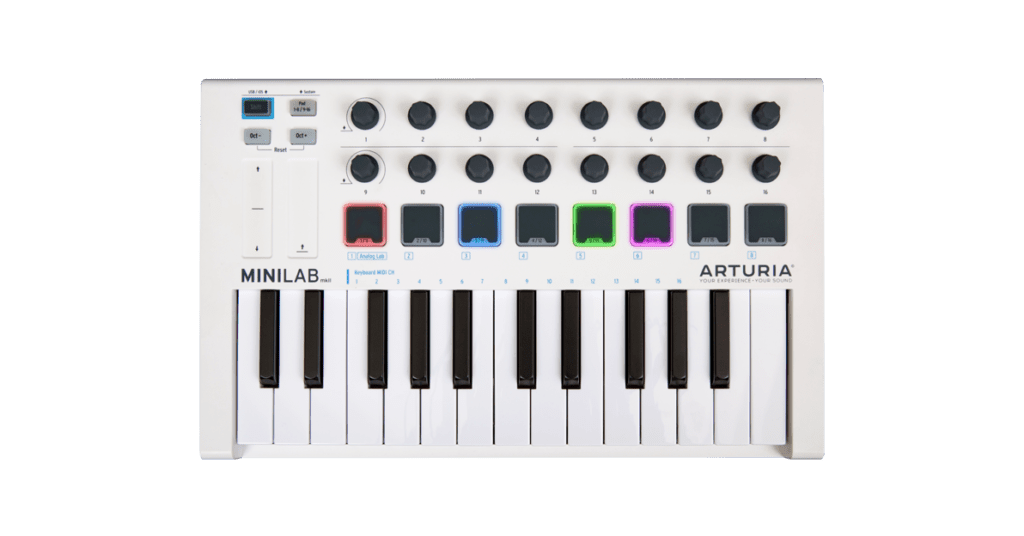
MiniLab MkII Firmware V1.1
- Improved control accuracy
Responsive controls are crucial to inspiring music creation. We’ve adjusted MiniLab MkII’s knobs to be more accurate and sensitive to subtle tweaks – capture every detail of your sound. - Configurable pad backlighting
RGB feedback on MiniLab MkII’s pads has been refined. Pads remain backlit even when not in use, and you can disable individual LEDs without creating new templates. - Enhanced Pitch Bend
The Pitch Bend touch strip is even smoother than before, with greater note accuracy, for effortless slides and bends. - Octave button feedback
We’ve changed the Oct- & Oct+ pad LEDs to be fixed rather than flashing. This makes octaves easier to track and the interface less distracting during your performance or session.
MiniLab MkII comes with 3 incredible software titles, free of charge. Instantly create slick, professional mixes and inspiring compositions right out the box.
- Analog Lab
Over 20 timeless vintage synths and keyboards combined with a curated selection of 550 stunning presets. - Ableton Live Lite
The ultimate accessible DAW for recording and performing, packed with essential instruments, effects and creative tools. - UVI Grand Piano Model D
A pristine German grand piano recorded in one of the finest studios in the world, complete with deep tone-shaping tools.
How to update my MiniLab MkII firmware?
Updating your MiniLab firmware will ensure you to enjoy your new controller at its best. Download and Install the Arturia Software Center (MAC Version)
- Connect your MiniLab MkII to your computer via the USB connection. Make sure not to use a USB hub.
- Launch the MIDI Control Center.
- If it is not immediately displayed, select the MiniLab MkII in the “Device” drop-down list in the top-left corner.
- The firmware section (just underneath) indicates the current firmware version and, if you are connected to internet, the latest firmware available.
- Click on this button to launch the update process:

Akai Professional MPK Mini Plus 37-Key USB MIDI Keyboard Controller
- Full 37-Key MIDI Keyboard: 3 octaves for melodic and harmonic play
- USB-Powered MIDI Controller: Connects easily to DAWs and studio gear
- Multiple Connectivity Options: Includes CV/Gate and MIDI I/O ports
As an affiliate, we earn on qualifying purchases.
Pricing and Availability
The firmware is available here.